
Object and Companion Object in Kotlin
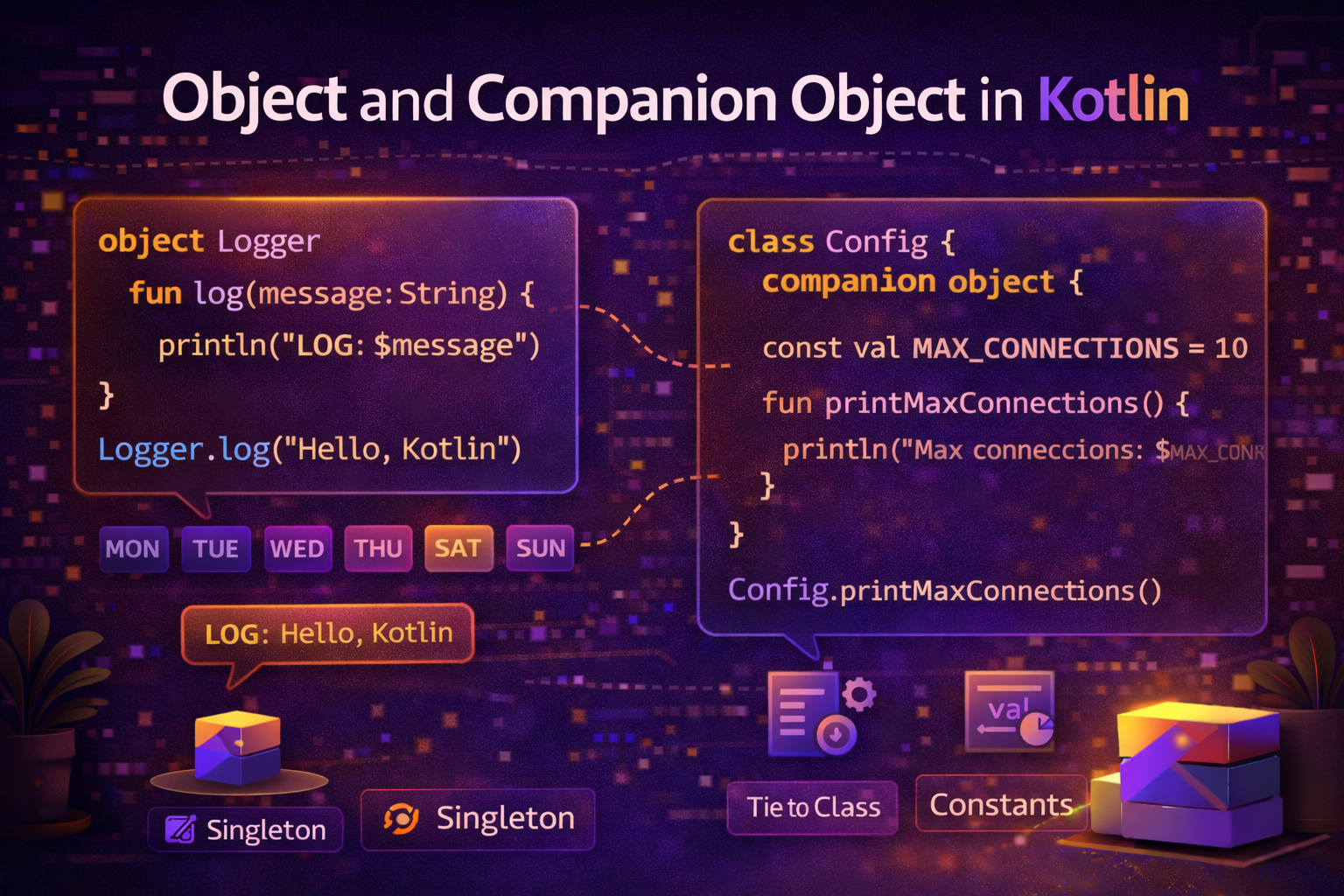
Two of the most commonly misunderstood features in Kotlin are object and companion object. They look similar but serve different purposes. This guide explains both clearly — what they are, when to use them, and how they appear in real Android code every day.
The Problem They Solve
In Java, you use the static keyword for class-level members — constants, factory methods, utility functions, and singletons. Kotlin has no static keyword. Instead, it gives you two cleaner mechanisms:
object— for singletons and anonymous objectscompanion object— for class-level members (Kotlin's replacement forstatic)
object Declaration — Singleton
The object keyword creates a singleton — a class that has exactly one instance, created automatically the first time it's accessed.
object AppConfig {
    const val BASE_URL = "https://api.androidnewworld.com"
    const val TIMEOUT_SECONDS = 30
    const val MAX_RETRY_COUNT = 3
    var isDebugMode = false

    fun getFullUrl(endpoint: String): String {
        return "$BASE_URL/$endpoint"
    }
}
You access it directly without creating an instance:
println(AppConfig.BASE_URL)                    // https://api.androidnewworld.com
println(AppConfig.getFullUrl("articles"))      // https://api.androidnewworld.com/articles
AppConfig.isDebugMode = true
Real-world analogy: Think of
objectlike a government — there is exactly one Government of India. You don't create a new one each time you need it. You just reference the one that exists. That's a singleton.
How Singleton Works Under the Hood
The Kotlin compiler turns an object declaration into a class with a private constructor and a public static INSTANCE field — the classic Java singleton pattern, but done automatically.
// What Kotlin generates (roughly)
public final class AppConfig {
    public static final AppConfig INSTANCE = new AppConfig();
    private AppConfig() { }
    // ... members
}
You get thread-safe, lazy initialization for free — no double-checked locking needed.
object — Common Use Cases
1. Application-Wide Configuration
object NetworkConfig {
    const val BASE_URL = "https://api.androidnewworld.com/v1/"
    const val CONNECT_TIMEOUT = 30L
    const val READ_TIMEOUT = 30L
    const val WRITE_TIMEOUT = 30L

    val defaultHeaders = mapOf(
        "Content-Type" to "application/json",
        "Accept" to "application/json"
    )
}
2. Utility / Helper Object
object DateUtils {
    private val formatter = SimpleDateFormat("MMM dd, yyyy", Locale.getDefault())

    fun formatDate(timestamp: Long): String {
        return formatter.format(Date(timestamp))
    }

    fun formatRelativeTime(timestamp: Long): String {
        val diff = System.currentTimeMillis() - timestamp
        val minutes = diff / 60_000
        val hours = minutes / 60
        val days = hours / 24

        return when {
            minutes < 1  -> "just now"
            minutes < 60 -> "${minutes}m ago"
            hours < 24   -> "${hours}h ago"
            days < 7     -> "${days}d ago"
            else         -> formatDate(timestamp)
        }
    }

    fun isToday(timestamp: Long): Boolean {
        val today = Calendar.getInstance()
        val date = Calendar.getInstance().apply { timeInMillis = timestamp }
        return today.get(Calendar.DAY_OF_YEAR) == date.get(Calendar.DAY_OF_YEAR) &&
               today.get(Calendar.YEAR) == date.get(Calendar.YEAR)
    }
}

// Usage
println(DateUtils.formatRelativeTime(someTimestamp))
println(DateUtils.isToday(System.currentTimeMillis()))  // true
3. Event Bus / App-Level State
object UserSession {
    var currentUser: User? = null
    var authToken: String? = null
    var isLoggedIn: Boolean = false

    fun login(user: User, token: String) {
        currentUser = user
        authToken = token
        isLoggedIn = true
    }

    fun logout() {
        currentUser = null
        authToken = null
        isLoggedIn = false
    }
}

// Anywhere in the app
if (UserSession.isLoggedIn) {
    showDashboard()
}
UserSession.login(user, "token_abc123")
4. Constants File
object Constants {
    // API
    const val BASE_URL = "https://api.androidnewworld.com/"
    const val API_KEY = "your_api_key_here"

    // SharedPreferences keys
    const val PREF_USER_ID = "pref_user_id"
    const val PREF_AUTH_TOKEN = "pref_auth_token"
    const val PREF_THEME = "pref_theme"

    // Bundle keys
    const val KEY_ARTICLE_ID = "article_id"
    const val KEY_USER_ID = "user_id"

    // Request codes
    const val REQUEST_CAMERA = 1001
    const val REQUEST_STORAGE = 1002
    const val REQUEST_LOCATION = 1003

    // Timeouts
    const val SPLASH_DELAY = 2000L
    const val DEBOUNCE_DELAY = 300L
}
object Extending Classes and Interfaces
An object can extend a class or implement interfaces:
interface Greeter {
    fun greet(name: String): String
}

object EnglishGreeter : Greeter {
    override fun greet(name: String) = "Hello, $name!"
}

object HindiGreeter : Greeter {
    override fun greet(name: String) = "Namaste, $name!"
}

fun greetUser(greeter: Greeter, name: String) {
    println(greeter.greet(name))
}

greetUser(EnglishGreeter, "Alice")   // Hello, Alice!
greetUser(HindiGreeter, "Bob")       // Namaste, Bob!
Anonymous Object — One-Time Object Without a Name
You can create an object on the fly without declaring a named class. This is commonly used for implementing listeners and callbacks:
// Implementing an interface inline
val clickListener = object : View.OnClickListener {
    override fun onClick(v: View?) {
        println("View clicked!")
    }
}
button.setOnClickListener(clickListener)

// Anonymous object with multiple interface implementations
val handler = object : TextWatcher, View.OnFocusChangeListener {
    override fun beforeTextChanged(s: CharSequence?, start: Int, count: Int, after: Int) {}
    override fun onTextChanged(s: CharSequence?, start: Int, before: Int, count: Int) {
        validateInput(s.toString())
    }
    override fun afterTextChanged(s: Editable?) {}
    override fun onFocusChange(v: View?, hasFocus: Boolean) {
        if (!hasFocus) validateInput(editText.text.toString())
    }
}
In practice, single-method interfaces are more commonly replaced with lambdas:
// Lambda is cleaner when interface has only one method
button.setOnClickListener { println("View clicked!") }
companion object — Class-Level Members
A companion object lives inside a class and provides members that belong to the class itself, not to instances. It's Kotlin's replacement for Java's static.
class User(val name: String, val email: String) {

    companion object {
        // Class-level constant
        const val MAX_NAME_LENGTH = 50

        // Factory function — creates User from different sources
        fun fromJson(json: String): User {
            // parse JSON
            return User("Parsed Name", "parsed@email.com")
        }

        fun guest(): User = User("Guest", "guest@anonymous.com")
    }
}

// Access companion members on the class name, not instance
println(User.MAX_NAME_LENGTH)          // 50
val user = User.fromJson("{...}")
val guest = User.guest()
companion object — Common Use Cases
1. Factory Functions
Factory functions create objects in ways the constructor alone can't express clearly:
class Article private constructor(
    val id: String,
    val title: String,
    val content: String,
    val type: String
) {
    companion object {
        fun createBlogPost(title: String, content: String): Article {
            return Article(
                id = UUID.randomUUID().toString(),
                title = title,
                content = content,
                type = "blog"
            )
        }

        fun createNewsItem(title: String, content: String): Article {
            return Article(
                id = UUID.randomUUID().toString(),
                title = title,
                content = content,
                type = "news"
            )
        }

        fun fromMap(map: Map<String, String>): Article {
            return Article(
                id = map["id"] ?: "",
                title = map["title"] ?: "",
                content = map["content"] ?: "",
                type = map["type"] ?: "blog"
            )
        }
    }
}

val post = Article.createBlogPost("Kotlin Guide", "Everything about Kotlin...")
val news = Article.createNewsItem("Android 16 Released", "Google announces...")
2. TAG Constant for Logging
One of the most common uses of companion object in Android:
class HomeFragment : Fragment() {

    companion object {
        private const val TAG = "HomeFragment"
    }

    override fun onViewCreated(view: View, savedInstanceState: Bundle?) {
        super.onViewCreated(view, savedInstanceState)
        Log.d(TAG, "onViewCreated called")
    }
}
3. Fragment/Activity Factory — newInstance Pattern
The recommended way to pass arguments to a Fragment:
class ArticleDetailFragment : Fragment() {

    companion object {
        private const val ARG_ARTICLE_ID = "article_id"
        private const val ARG_CATEGORY = "category"

        // Factory function — ensures required arguments are always provided
        fun newInstance(articleId: String, category: String): ArticleDetailFragment {
            return ArticleDetailFragment().apply {
                arguments = Bundle().apply {
                    putString(ARG_ARTICLE_ID, articleId)
                    putString(ARG_CATEGORY, category)
                }
            }
        }
    }

    private val articleId: String by lazy {
        requireArguments().getString(ARG_ARTICLE_ID) ?: error("Article ID required")
    }

    private val category: String by lazy {
        requireArguments().getString(ARG_CATEGORY) ?: "general"
    }

    override fun onViewCreated(view: View, savedInstanceState: Bundle?) {
        super.onViewCreated(view, savedInstanceState)
        viewModel.loadArticle(articleId)
    }
}

// Usage — from another Fragment or Activity
val fragment = ArticleDetailFragment.newInstance(
    articleId = "article_001",
    category = "kotlin"
)
4. Providing Dependencies / Injection
class UserRepository private constructor(
    private val apiService: ApiService,
    private val userDao: UserDao
) {
    companion object {
        @Volatile
        private var instance: UserRepository? = null

        fun getInstance(apiService: ApiService, userDao: UserDao): UserRepository {
            return instance ?: synchronized(this) {
                instance ?: UserRepository(apiService, userDao).also {
                    instance = it
                }
            }
        }
    }
}
Naming a companion object
By default, companion objects are accessed as Companion. You can give them a custom name:
class MyClass {
    companion object Factory {
        fun create(): MyClass = MyClass()
    }
}

// Access via class name (most common)
val obj = MyClass.create()

// Access via companion name (less common)
val obj = MyClass.Factory.create()
companion object Implementing an Interface
interface JsonParser<T> {
    fun fromJson(json: String): T
}

class User(val name: String, val email: String) {

    companion object : JsonParser<User> {
        override fun fromJson(json: String): User {
            // parse JSON
            return User("Parsed", "parsed@email.com")
        }
    }
}

// Can be passed where JsonParser<User> is expected
fun <T> parseData(json: String, parser: JsonParser<T>): T {
    return parser.fromJson(json)
}

val user = parseData("{...}", User)  // User's companion object is passed
object vs companion object — Key Differences
object |
companion object |
|
|---|---|---|
| Standalone | ✅ Declared on its own | ❌ Must be inside a class |
| Access | Via its own name | Via the enclosing class name |
| One per file | Can have many | One per class |
| Use for | Singletons, utils, constants | Class-level members, factories, TAG |
| Inherits from | Can extend class/interface | Can extend class/interface |
| Java equivalent | Singleton class | static members |
Common Mistakes to Avoid
Mistake 1: Using object when you need multiple instances
// ❌ Wrong — object is singleton, only one user can exist
object User {
    var name = ""
    var email = ""
}

// ✅ Use class for things you need multiple of
class User(val name: String, val email: String)
Mistake 2: Putting mutable shared state in object carelessly
// ❌ Dangerous in multi-threaded code
object Counter {
    var count = 0  // not thread-safe
}

// ✅ Use atomic operations or synchronization
object Counter {
    private val _count = AtomicInteger(0)
    val count: Int get() = _count.get()
    fun increment() = _count.incrementAndGet()
}
Mistake 3: Accessing companion members via instance
class User(val name: String) {
    companion object {
        fun guest() = User("Guest")
    }
}

val user = User("Alice")
val guest = user.guest()   // ❌ Works but misleading — looks like instance method
val guest = User.guest()   // ✅ Clear — this is a class-level operation
Mistake 4: Not using const for compile-time constants
companion object {
    val MAX_SIZE = 100       // ❌ val — runtime constant, slightly less efficient
    const val MAX_SIZE = 100 // ✅ const val — compile-time constant, inlined by compiler
}
Summary
objectcreates a singleton — one instance for the entire app, accessed by name- Use
objectfor app-wide config, utilities, constants, and event buses companion objectprovides class-level members — Kotlin's replacement for Javastatic- Use
companion objectfor factory functions,TAGconstants, andnewInstancepatterns - Anonymous
objectlets you implement interfaces inline without naming a class - Both
objectandcompanion objectcan extend classes and implement interfaces - Always access
companion objectmembers via the class name, not an instance - Use
const valin companion objects for compile-time constants - Avoid mutable shared state in
objectwithout thread safety consideration
These two features replace the static keyword entirely in Kotlin and do it in a much cleaner, more object-oriented way. You'll see them in practically every Android codebase.
Happy coding!
Comments (0)
Sign in to leave a comment.
No comments yet. Be the first to share your thoughts.